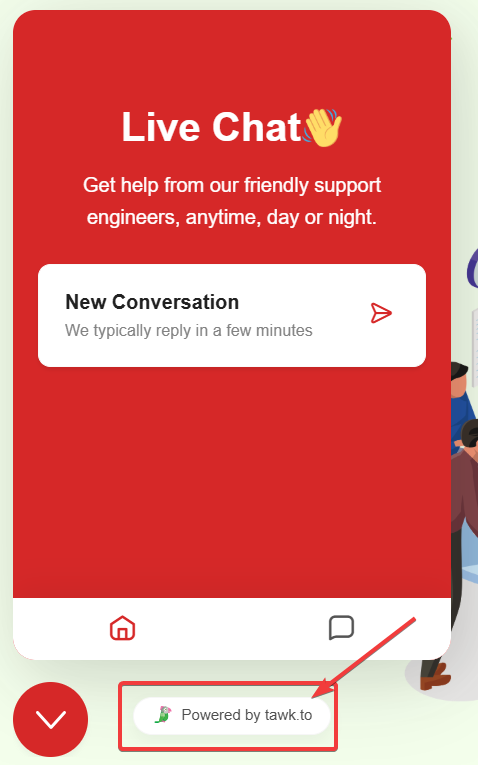
Tawk.to is one of the most popular free live chat solutions for websites. However, the free version displays a "Powered by tawk.to" branding at the bottom of the chat widget. While this is understandable for a free service, many businesses prefer a cleaner, unbranded look. In this guide, we'll show you how to remove the Tawk.to branding using a simple JavaScript snippet that works in 2026.
Why Remove Tawk.to Branding?
-
Professional Appearance: A clean, unbranded widget looks more professional and polished.
-
Brand Consistency: Third-party branding can distract from your own company identity.
-
Client Work: When building websites for clients, they often prefer no external branding.
-
Competitive Edge: You don't want to advertise another service on your website.
Official Method (Paid Option)
Tawk.to offers an official "Remove Branding" add-on for approximately $19/month. This is the safest and most reliable method that guarantees compliance with their Terms of Service.
-
Log in to your Tawk.to Dashboard
-
Navigate to Add-ons in the left sidebar
-
Click "Activate Now" under Remove Branding
-
Complete the payment process
Free JavaScript Method (Step by Step)
If you prefer a free solution, you can use JavaScript to hide the branding. This method uses a MutationObserver to detect when Tawk.to loads the branding element and immediately removes it.
-
Locate Your Tawk.to Script
-
Find the existing Tawk.to embed code on your website (usually before
</body>). -
It looks like:
<script src="https://embed.tawk.to/YOUR_ID/YOUR_WIDGET"></script>
-
-
Add the Branding Removal Script
-
Paste the following code immediately after your Tawk.to initialization code, inside the same
<script>tag. -
This script watches for DOM changes and removes branding elements as they appear.
-
-
The Complete Code
-
Replace
YOUR_PROPERTY_IDandYOUR_WIDGET_IDwith your actual values from Tawk.to Dashboard.
-
Complete Code (Copy & Paste)
<!--Start of Tawk.to Script with Branding Removal-->
<script type="text/javascript">
    var Tawk_API = Tawk_API || {}, Tawk_LoadStart = new Date();
    (function () {
        var s1 = document.createElement("script");
        var s0 = document.getElementsByTagName("script")[0];
        s1.async = true;
        s1.src = 'https://embed.tawk.to/YOUR_PROPERTY_ID/YOUR_WIDGET_ID';
        s1.charset = 'UTF-8';
        s1.setAttribute('crossorigin', '*');
        s0.parentNode.insertBefore(s1, s0);
    })();

    // Branding Removal Script
    (function hideTawkBranding() {
        function removeBranding() {
            document.querySelectorAll('.tawk-text-center, .tawk-branding')
                .forEach(function (el) {
                    el.innerHTML = '';
                    el.style.backgroundColor = '#ffffff';
                    el.style.minHeight = '10px';
                });

            document.querySelectorAll('a[href*="tawk.to"]')
                .forEach(function (el) {
                    if (el.textContent.includes('Powered by')) {
                        el.innerHTML = '';
                        el.style.backgroundColor = '#ffffff';
                        if (el.parentElement) {
                            el.parentElement.innerHTML = '';
                            el.parentElement.style.backgroundColor = '#ffffff';
                        }
                    }
                });
        }

        removeBranding();

        var observer = new MutationObserver(function() {
            removeBranding();
        });

        if (document.readyState === 'loading') {
            document.addEventListener('DOMContentLoaded', function() {
                observer.observe(document.body, { childList: true, subtree: true });
                removeBranding();
            });
        } else {
            observer.observe(document.body, { childList: true, subtree: true });
        }

        setTimeout(removeBranding, 1000);
        setTimeout(removeBranding, 3000);
        setTimeout(removeBranding, 5000);
    })();
</script>
<!--End of Tawk.to Script-->
How It Works
-
MutationObserver: Watches for any changes to the DOM and triggers the removal function when Tawk.to injects the branding element.
-
Multiple Selectors: Targets
.tawk-text-center,.tawk-branding, and links containing "tawk.to" to catch the branding regardless of internal updates. -
Delayed Retries: Runs at 1, 3, and 5 seconds after page load to catch elements that load asynchronously.
-
White Background Replace: Instead of hiding, it clears content and replaces with white background to maintain widget structure.
Risks & Considerations
- Terms of Service
This may violate Tawk.to's Terms of Service. While rarely enforced, they could theoretically suspend your account.
-
Future Updates
-
If Tawk.to changes their class names or structure, you may need to update the selectors.
-
We recommend checking periodically after major Tawk.to updates.
-
-
When It's Safe to Use
-
Personal or hobby projects
-
Testing and development environments
-
Low-traffic websites
-
When you plan to upgrade to paid eventually
-
Platform-Specific Instructions
-
WordPress: Add the code to your theme's footer.php file or use a plugin like "Insert Headers and Footers" before
</body>. -
Shopify: Go to Online Store → Themes → Edit Code → theme.liquid and paste before
</body>. -
Wix/Squarespace: Use the custom code injection area in your site settings.
-
Static HTML: Paste directly before the closing
</body>tag.
Conclusion
Removing the "Powered by tawk.to" branding is possible using JavaScript, but comes with some risks. For personal projects or testing, this free method works well. For business-critical applications, we recommend supporting Tawk.to by purchasing their Remove Branding add-on for full compliance and peace of mind.