Visme Forms are excellent tools for capturing leads, but the free version forces a large, sticky "Powered by Visme" banner at the bottom of every form.
The Challenge: Unlike standard page elements, this branding lives inside a secure iframe. This means simple JavaScript or CSS deletion (display: none) will not work due to cross-origin security policies (CORS).
In this guide, we will implement the "Overlay Mask" method,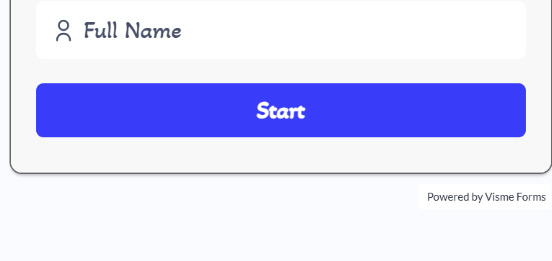 a clever CSS trick to physically cover the branding element without violating security protocols.
Why Remove Visme Branding?
Professional Appearance: A clean footer builds more trust than one cluttered with third-party logos.
Seamless Integration: Forms should look like they belong to your website, not Visme's.
Client Requirements: Corporate clients often mandate zero external branding on their platforms
Note: The official way to remove branding is to upgrade to the Visme Business Plan (approx. $29/month) and toggle "Visme Branding" to OFF in the form settings. If you are on the free tier, proceed with the method below.
The Solution: The "Overlay Mask"
Since we cannot delete the element inside the iframe, we will create a container around the form and place a "physical" box (the mask) exactly over the branding area.
Step 1: The HTML Structure
Wrap your Visme embed code in a div with position: relative. This establishes a coordinate system for us to absolute-position the mask.
HTML
<div class="visme-mask-wrapper" style="position: relative; overflow: hidden; padding-bottom: 0;">

    <div class="visme_d" data-title="My Form" data-url="..."></div>

    <div class="visme-branding-mask"></div>

</div>

<script src="https://static-bundles.visme.co/forms/vismeforms-embed.js"></script>
Step 2: The CSS Styling
Add the following styles to create the mask. The critical factor is matching the background-color of your mask to the background color of your website's footer or section.
CSS
.visme-branding-mask {
    position: absolute;
    bottom: 0;
    left: 50%;          /* Center alignment strategy */
    width: 100%;        /* Cover full width */
    height: 116px;      /* Precise height to cover Visme branding */
    background-color: #ffffff; /* MUST match your page background */
    z-index: 100;       /* Sit strictly on top of the form iframe */
    transform: translateX(-50%); /* Center the mask if width < 100% */
}
Production Settings
To ensure flawless concealment, you must match the mask color to the container background. Here are the production settings used for the Softsasi implementation:
| Form Type | Mask Height | Background Color | Strategy |
| Contact Form | 116px |
#fafbff (Grey/White) |
Matches contact section background. |
| Newsletter | 116px |
#ffffff (Pure White) |
Matches the website footer. |
Complete Code (Copy & Paste)
Here are the robust snippets ready for your footer.html or contact page.
Scenario A: Contact Form (Grey Background)
HTML
<div class="visme-mask-wrapper" style="position: relative; overflow: hidden; padding-bottom: 0;">
    <div class="visme_d" data-title="Contact Form" data-url="..." data-domain="forms"></div>

    <div class="visme-branding-mask"
         style="position: absolute; bottom: 0; left: 0; width: 100%; height: 116px; background-color: #fafbff; z-index: 100;">
    </div>
</div>
Scenario B: Newsletter Form (White Background)
HTML
<div class="visme-mask-wrapper" style="position: relative; overflow: hidden; padding-bottom: 0;">
    <div class="visme_d" data-title="Newsletter" data-url="..." data-domain="forms"></div>

    <div class="visme-branding-mask"
         style="position: absolute; bottom: 0; left: 0; width: 100%; height: 116px; background-color: #ffffff; z-index: 100;">
    </div>
</div>